

Realistic, customer-specific simulations
Nimblr runs advanced phishing and smishing simulations based on real-world attack data. Every simulation uses realistic sender profiles, local context, and current threat intelligence so your team encounters the scams actually targeting organizations like yours, right now.
Simulations are personalized using your organization's own data: executive names, your logo, internal software, and more. This level of customization makes each simulation harder to spot, which is exactly the point.
To keep simulations unpredictable, send timing varies automatically. Users can't learn to expect a test on a particular day or time - they have to stay sharp continuously.
The simulations are selected per user based on their individual history. Someone who repeatedly misses fake sender cues gets more of those. Someone who clicks on reward-based lures gets targeted there instead. This behavioral targeting maximizes learning impact for each individual.
Nimblr Instant Learning
Each simulated attack is linked to a customized reminder for those users who are tricked into clicking the link, or opening the attachment, in a simulated attack. The reminder is called Nimblr Instant Learning and displays the message that tricked the user, along with interactive tips on what to do differently next time. Along with the specific tips, the user is also offered to start an optional basic training module tied to the current simulation.
Monitoring current phishing and smishing trends
The simulated attacks are generated and sent automatically to all active users in the Nimblr security awareness program.
Nimblr monitors current phishing and smishing trends and ongoing attacks to quickly create new simulations and train users before they are exposed to the real attacks.
What makes a simulation realistic?
A realistic phishing simulation does more than look like a real email. It needs to reflect current attack techniques, target the right people, arrive unpredictably, and use context that feels genuinely relevant to the recipient.
Nimblr builds realism into every layer:
✔️ Real-world attack data — simulations are based on thousands of active threats monitored and analyzed by Nimblr experts
✔️ Customer-specific personalization — your CFO's name, your logo, your internal tools
✔️ Behavioral targeting — each user gets the simulation type they're most likely to fall for
✔️ Randomized delivery — send timing varies so users stay alert year-round, not just after a known test window
✔️ Multi-vector coverage — phishing, smishing, fraud, malware, and social engineering — not just email
✔️ Continuous updates — new simulations added as new threats emerge, so your library never goes stale
✔️ 30+ languages — for locally relevant and convincing simulations
Frequently Asked Questions
How realistic are Nimblr's phishing simulations?
Nimblr's simulations are built from real attack data, customized with your organization's own information, and delivered at randomized times so users can't anticipate them. They cover phishing, smishing, fraud, and malware and are continuously updated as new threats emerge.
What is the difference between security awareness training and IT security training?
Security awareness training focuses on changing human behavior of all employees to prevent people-related cyber risks. IT security training targets technical staff and emphasizes system configuration, infrastructure, and threat mitigation from a technical perspective.
How often should employees take part in security awareness training?
Training should be continuous, with the frequency of courses and simulations adapted to each user’s needs.
Why is security awareness training important for my organization?
Security awareness training reduces human error, the leading cause of cyber incidents, by teaching users to recognize and avoid threats.
What topics are covered in the security awareness training?
Our training is continuously updated to reflect current threats and covers key human-related risks such as phishing, social engineering, password hygiene, credential theft, and safe browsing.
What makes Nimblr stand out?
We offer adaptive security awareness training based on real behavior and current threats. With phishing simulations, instant feedback, and automated updates, users learn what they need, when they need it.
Examples of simulated attacks
The simulated attacks are an important part of Nimblr Security Awareness and consist of both customised and generic simulations of phishing, fraud, malware and many other types of IT-related threats.
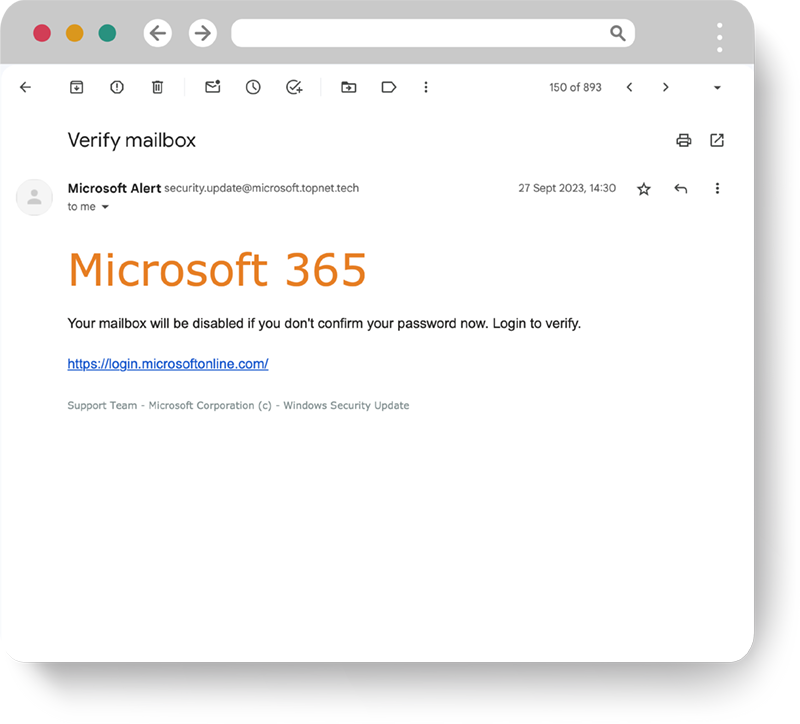
Microsoft Office 365
Simulated phishing that claims that the user needs to sign in to Microsoft Office 365 and verify their inbox. In real life, attacks of this type are used to get hold of the user’s log-in details.
To optimise learning, many training sessions are linked to everyday activities and are often initiated through a simulated attack. With Nimblr Instant Learning, users who are fooled by a simulated attack receive immediate feedback and concrete tips on how to avoid similar attacks in the future.
From the user’s own organisation
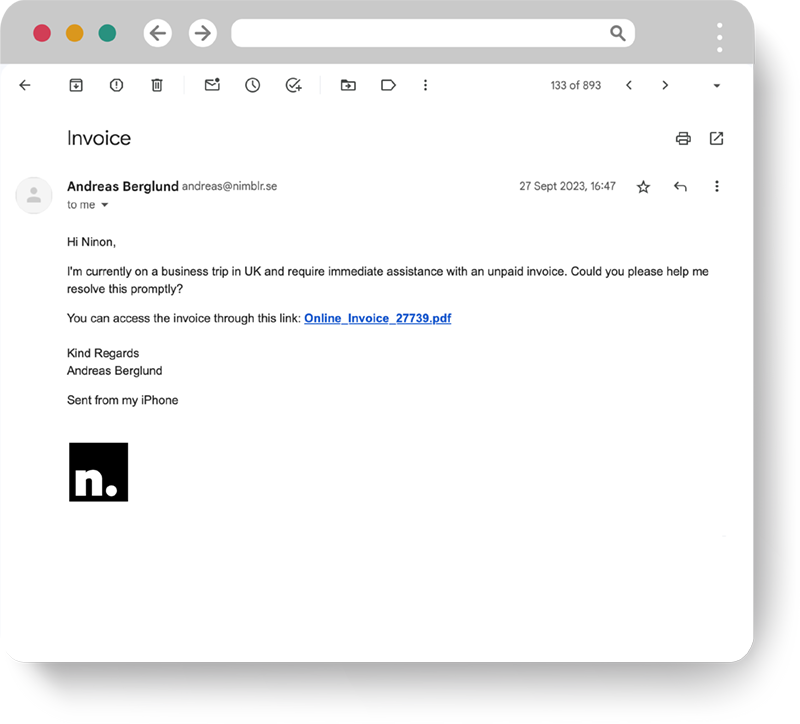
Simulated attack pretending to come from someone in your organisation. The data is taken from the organisation's Nimblr configuration. In reality, this type of attack has been used to infect organisations with ransomware.
Smishing simulation add-on
A simulated phishing SMS that mimics real-world tactics deployed by scammers. This helps build security awareness and demonstrates the importance of taking care when interacting with text messages.
How Nimblr's security awareness training works
Micro training

Simulated attacks

Instant learning

Zero-Day Classes
Smishing simulation add-on
Automated reporting
Get a personalized demo session at your convenience.
Book a demo meeting and let one of our experts walk you through Nimblr solution, the platform, and how quickly you can get started.