Reports

Security awareness reporting and metrics

Prove your training is actually reducing risk

Security awareness reporting is the process of measuring how people in an organization complete training, respond to simulated phishing attacks, and retain security knowledge over time. It matters because it is the only way to confirm that a training program is actually reducing risk. Completion numbers alone cannot do that, which is why Nimblr's reporting is built on behavior.

The result is a clear, current picture of your organization's security awareness, ready for IT teams, auditors, and boards. It is one of the reasons more than 5,000 IT decision-makers have chosen Nimblr.
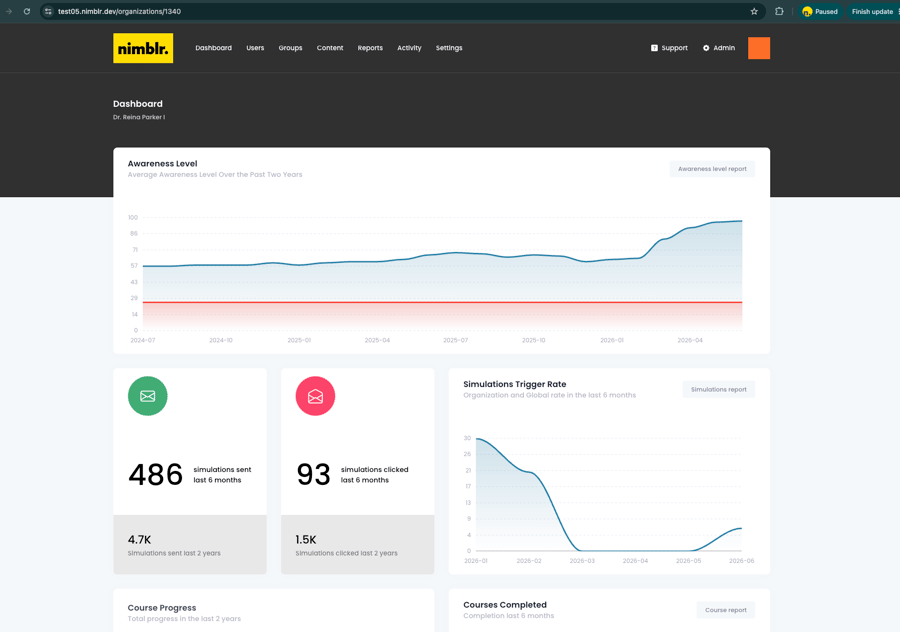
Nimblr dashboard displaying organization-wide security awareness trends and phishing simulation metrics.

What does the security awareness dashboard show?

The dashboard shows one Awareness Level score for the entire organization, tracked over time. The score sits on a trend line, so admins can see at a glance whether awareness is going up or down. A rising score over time is the signal that training is reducing risk.

Alongside the score, the dashboard tracks simulation click rate, course completion progress, and active users, trended over the last six months by default. Metrics are built from monthly summary data, so every month is directly comparable to the last. When you need more detail, the Reports section supports custom date ranges and drill-down into any single user's history.

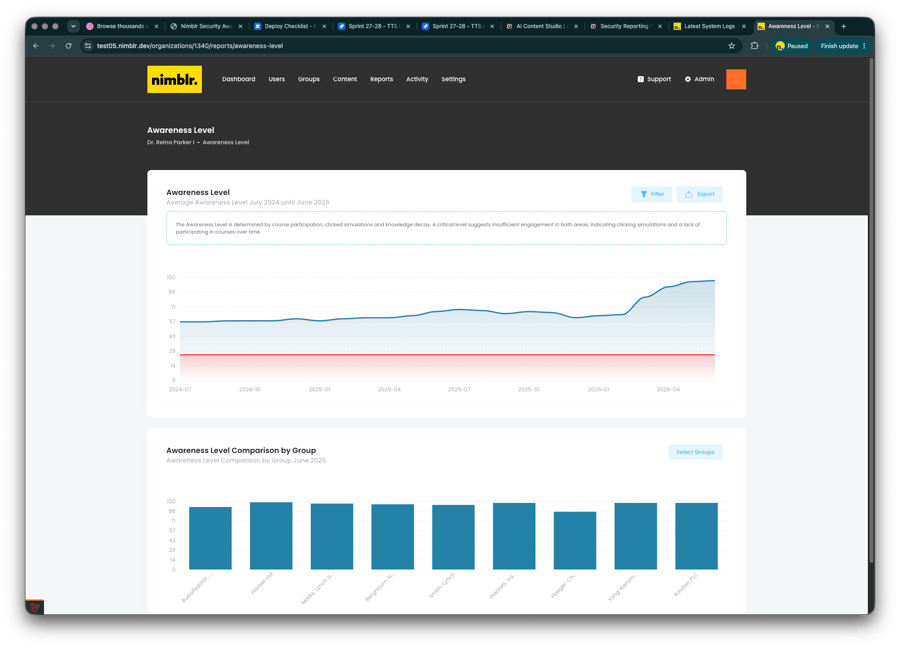
Nimblr security awareness dashboard comparing awareness levels across different user groups with trend charts and group performance metrics.

How is the Awareness Level calculated and compared across teams?

The Awareness Level is a score from 0 to 100, calculated for each individual and for the organization as a whole. The main factors are course participation, clicked simulations, and how much a person's retained security knowledge drops over time since their last completed course or simulation. The score covers three areas:

  • Fraud: phishing, BEC, spoofing, and social engineering
  • Malware: ransomware, trojans, scripts, and macros
  • Behavior: physical security, password management, and mobile device management

Scores can be compared across teams or organizations in a bar chart, side by side. Teams with lower scores stand out immediately and can be given additional training, so effort goes where the risk actually is.

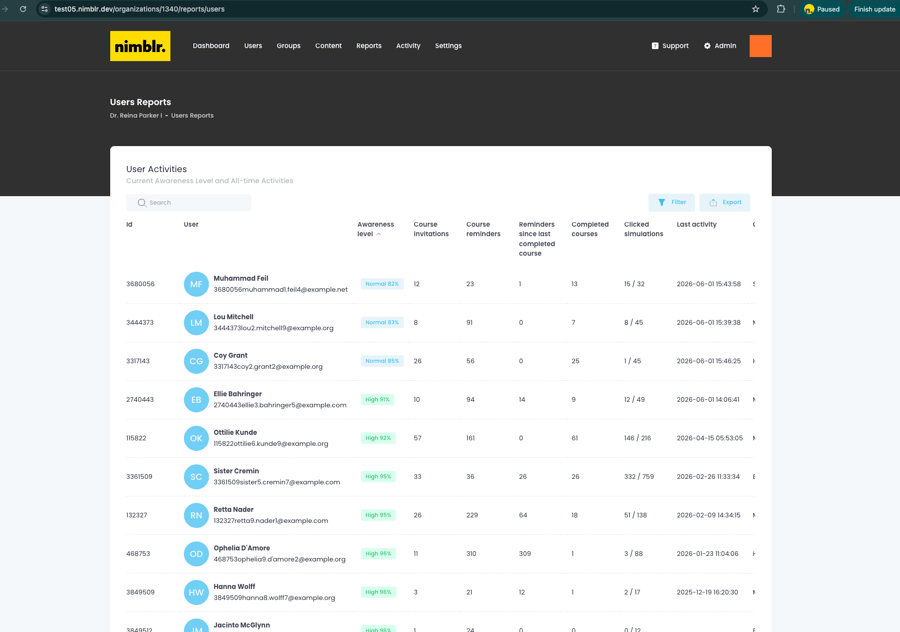
Screenshot Nimblr list of users

What does the user activity report include?

The user activity report lists every user in the organization along with their Awareness Level and activity history. Each row includes course invitations, reminders, completed courses, clicked simulations, and the date of last activity.

The list can be searched, filtered, and exported, and sorting by Awareness Level identifies the users with the lowest scores in seconds.

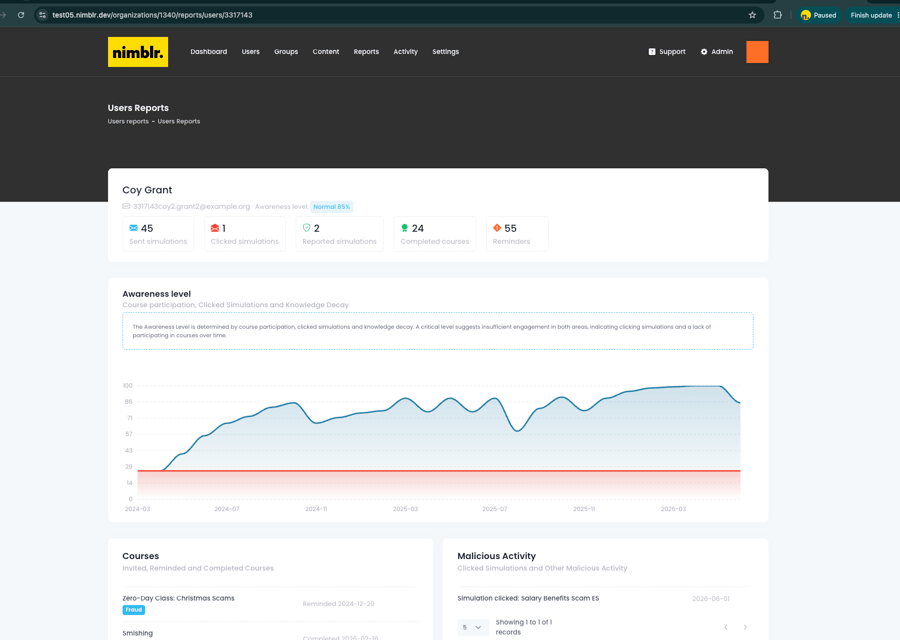
Nimblr screenshot awareness level over time

What does an individual user report contain?

An individual user report shows the Awareness Level and activity history for one person: completed courses, sent and clicked simulations, and reminders. A trend line shows that person's score over time, and a dated record shows any simulations the person clicked. So when someone asks what happened with a specific user, the answer is one click away, not a reconstruction.

What is included in the monthly report?

The monthly report is an automated email that summarizes Awareness Level data for the reporting period. It includes:

  • The overall Awareness Level score and a breakdown of users into High, Normal, Low, and Critical bands
  • The courses sent and completed during the month
  • A comparison of your organization's simulation click rate against the global average

Each admin role automatically sees the scope that matches it: organization admins see the whole organization, group auditors see their assigned groups, and reseller admins see aggregated data across every organization they manage. Reports can also be sent to stakeholders the organization selects, including customers and partners. Nothing to configure, no manual compiling, no exporting data into slides the night before a meeting.

report_button

Documentation that holds up in an audit

Beyond the reports, the Event Log records every event in the program as it happens: when a simulated attack is sent, when a user clicks a link in it, and when training invitations go out. Together with structured reporting, it simplifies audit readiness and regulatory documentation. If your organization needs to demonstrate an active security awareness program under frameworks like NIS2, the evidence is already there.

How reporting connects to training

Nimblr collects data from all training activity in one platform. Responses to Simulated Attacks, completed Micro Trainings, and Instant Learning sessions automatically update Awareness Level scores and the Event Log, so reporting always reflects the full program. Training generates the data, and the data shows you where to train next.

oatly
acne-studios
bonnier-news
pharmakon
hexatronic

FAQs

What is an Awareness Level score?
A score from 0 to 100 that measures how well a person or organization recognizes and responds to security threats. It is calculated from course participation and clicked simulations.
What do the High, Normal, Low, and Critical categories mean?
They are risk bands that group users by their Awareness Level score, from most prepared to least prepared, so admins can see who needs attention first.
Can Awareness Level scores be compared across teams?
Yes. The Awareness Level report includes a bar chart that compares scores across every team in the organization.
How often is the security awareness report sent?
Once a month. The automated report is sent by email to admins and selected stakeholders, with no manual compiling.
Who receives the monthly report?
The users an organization selects, which can include internal admins, customers, and partners. Each admin role automatically sees its matching scope.
Does the monthly report include a comparison to other organizations?
Yes. It compares your organization's simulation click rate to the global average click rate.
Can the user activity report be exported?
Yes. The user activity report can be searched, filtered, and exported for record keeping or audits.
Is the dashboard updated in real time?
Dashboard metrics come from monthly summary data, which keeps trends stable and comparable month to month. The most recent activity is always available in the Event Log.
Can Nimblr reports be used for compliance audits?
Yes. Structured reports and the Event Log document an active security awareness program, which supports audit readiness under frameworks like NIS2.

See the reporting in action

Book a demo and let one of our experts walk you through the platform, the Awareness Level, and how quickly you can get started.

Features

DataProtection_Shield

Role-based learning

Security training matched to real job risk. Nimblr role-based learning matches training depth to the risk each role carries.
Nimblr illustration of a bug inside a warning triangle.

Micro training

Interactive lessons under five minutes, in 30+ languages, delivered when they are most relevant. 
flash

Instant learning

Click a simulated attack and Nimblr delivers immediate feedback and a short lesson, turning mistakes into learning, not punishment.
DataProtection_Warning

Simulations

Realistic, customer-specific phishing, smishing, fraud and malware simulations, built from real attack data and delivered at randomized times. 
Content_small

Custom content

Turn your IT Policy, Code of Conduct, or company rules into a native Nimblr course. AI builds the draft, you edit with prompts, publish in any language.
Nimblr illustration enlightning showinga brain in a lightbulb.

Platform

Fully automated security awareness training platform that drives behavioral change and security culture. 

nimblr-puzzle-pieces-connection-solution-game (1)

Integrations

Connect Nimblr to Microsoft Entra ID, Google Directory, or SFTP for automated user sync, and activate the Microsoft report button. Setup guides included.
nimblr-trusted-by-many

Set up

Set up your organization and screen users to get your Nimblr security awareness program running quickly.