Prepare users

Phishing and Smishing Simulations

Realistic, organization-specific simulations

real-world

Simulated attacks

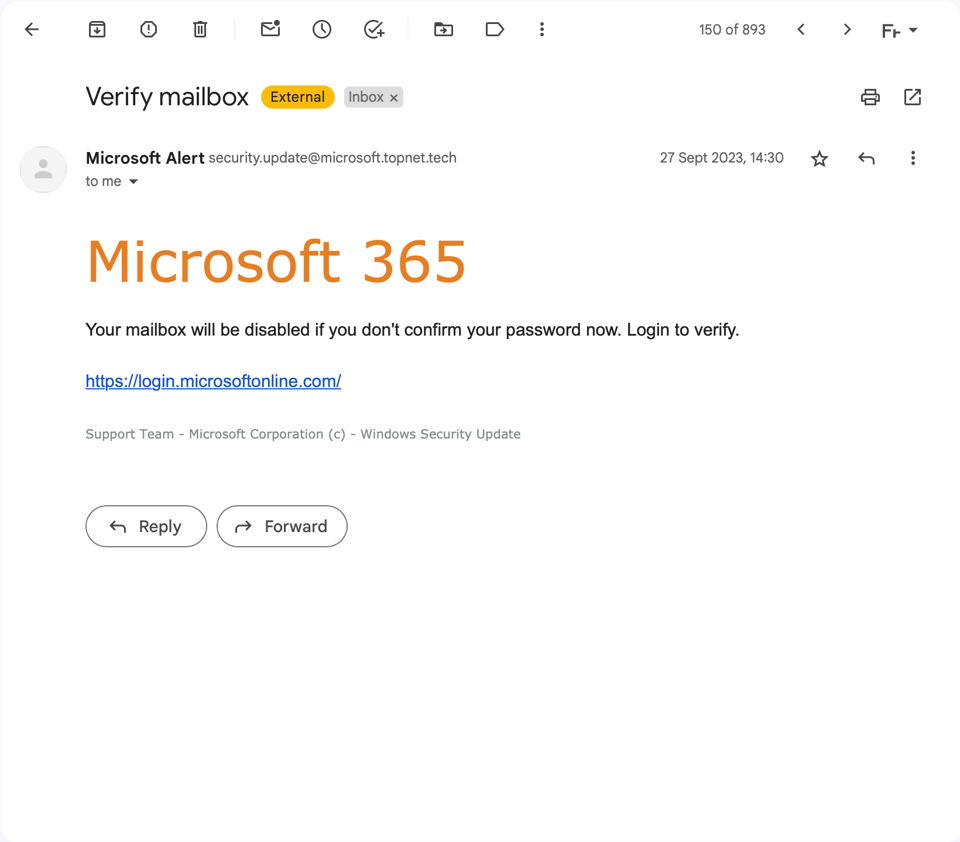
Nimblr's simulated attacks mirror the real threats your users actually face, customized with your organization's own data. Simulations run across phishing, smishing, fraud, and malware, and update continuously from live threat intelligence. Automated, realistic, and designed to drive lasting behavior change.

Your data

Personalized to your organization

Nimblr runs advanced phishing and smishing simulations based on real-world attack data. Every simulation uses realistic sender profiles, local context, and current threat intelligence, so your team encounters the scams actually targeting organizations like yours, right now, whether they land in an inbox or a text message.

Simulations are personalized using your organization's own data: executive names, your logo, internal software, and more. This level of customization makes each simulation harder to spot, which is exactly the point.

To keep simulations unpredictable, send timing varies automatically. Users can't learn to expect a test on a particular day or time, they have to stay sharp continuously, on email and mobile alike.

The simulations are selected per user based on their individual history. Someone who repeatedly misses fake sender cues gets more of those. Someone who clicks on reward-based lures gets targeted there instead. Someone who's vulnerable to a text from an unknown number gets more smishing exposure. This behavioral targeting maximizes learning impact for each individual.
Real intelligence

Why realism matters

A simulation only works if it prepares people for what they'll actually encounter. Attackers don't send obviously fake emails with spelling errors and suspicious links anymore, and they don't stop at email. They research their targets, spoof trusted senders, time their attacks around real business events, and increasingly move to SMS, where people tend to be less guarded and more likely to click without thinking.

Smishing has grown into one of the fastest-moving threats in this category. A text message that appears to come from a delivery service, a bank, or a colleague can bypass the instincts people have built up around email, simply because it arrives somewhere that still feels informal and personal. Training people only on email leaves this entire attack surface uncovered.

This is why Nimblr treats smishing as a core simulation type, not an afterthought. If the training your team receives doesn't reflect the sophistication and range of what's actually out there, the confidence it builds is false. Realistic simulations, across every channel attackers use, are what turn awareness into a skill people can actually rely on when it counts.

Feedback

Instant Learning

Each simulated attack is linked to a customized reminder for users who are tricked into clicking a link, opening an attachment, or replying to a suspicious text. This reminder is called Nimblr instant learning and displays the message that tricked the user, along with interactive tips on what to do differently next time. Along with specific tips, the user is also offered an optional training module tied to the current simulation.
Simulation_Microsoft_Desktop_1640x1440_English

realism

What makes a simulation realistic?

A realistic simulation does more than look like a real message. It needs to reflect current attack techniques, target the right people, arrive unpredictably, cover the channels attackers actually use, and use context that feels genuinely relevant to the recipient.

Nimblr builds realism into every layer:

Real-world attack data: simulations are based on thousands of active threats monitored and analyzed by Nimblr experts

Customer-specific personalization: your CFO's name, your logo, your internal tools

Behavioral targeting: each user gets the simulation type they're most likely to fall for

Randomized delivery: send timing varies so users stay alert year-round, not just after a known test window

Multi-vector coverage: phishing, smishing, messaging platforms

Continuous updates: new simulations added as new threats emerge, so your library never goes stale

30+ languages: for locally relevant and convincing simulations

FAQ

Frequently Asked Questions

How realistic are Nimblr's phishing and smishing simulations?
Nimblr's simulations are built from real attack data, customized with your organization's own information, and delivered at randomized times so users can't anticipate them. They cover phishing, smishing, fraud, and malware, and are continuously updated as new threats emerge.
What us the difference between phishing and smishing simulations?
Phishing simulations arrive by email and mimic tactics like fake login requests, invoice fraud, or messages spoofed from within your organization. Smishing simulations use the same principles but arrive by text message, testing vigilance on mobile devices where people tend to be less guarded.
How does Nimblr personalize simulations for our organization?
Simulations are built using your organization's own data, including executive names, your logo, and internal tools you use. This makes each simulation harder to spot and more representative of what a real attack against your team would look like.
How are simulations targeted to individual users?
Each user receives simulations based on their own history. Someone who misses fake sender cues gets more of those. Someone who responds to reward-based lures gets tested there instead. This behavioral targeting means no two users necessarily see the same simulation library.
How often are new simulations added?
Nimblr monitors current phishing and smishing trends continuously and creates new simulations as new attack techniques emerge, so users are trained on threats before they encounter the real version.
What happens when a user clicks a simulated attack?
The user receives Nimblr instant learning immediately: a message showing what they clicked, why it was risky, and specific tips on what to look for next time. They're also offered an optional training module tied to that specific simulation.
Can simulations be scheduled or does timing vary?
Send timing varies automatically. This is intentional, since users who could predict a test day or time would only stay alert around that window. Randomized delivery keeps awareness consistent year-round.

Ready to see how simulations work?

Book a 30-minute demo with a Nimblr expert

Features

DataProtection_Shield

Role-based learning

Security training matched to real job risk. Nimblr role-based learning matches training depth to the risk each role carries.
Nimblr illustration of a bug inside a warning triangle.

Micro training

Interactive lessons under five minutes, in 30+ languages, delivered when they are most relevant. 
flash

Instant learning

Click a simulated attack and Nimblr delivers immediate feedback and a short lesson, turning mistakes into learning, not punishment.
bulb

Platform

Fully automated security awareness training platform that drives behavioral change and security culture. 
Content_small

Custom content

Turn your IT Policy, Code of Conduct, or company rules into a native Nimblr course. AI builds the draft, you edit with prompts, publish in any language.
Trend

Reporting

Track security awareness with Nimblr's Awareness Level, automated monthly reports, and a full event log. Clear insights for admins, auditors, and boards.
nimblr-puzzle-pieces-connection-solution-game (1)

Integrations

Connect Nimblr to Microsoft Entra ID, Google Directory, or SFTP for automated user sync, and activate the Microsoft report button. Setup guides included.
nimblr-trusted-by-many

Set up

Set up your organization and screen users to get your Nimblr security awareness program running quickly.